


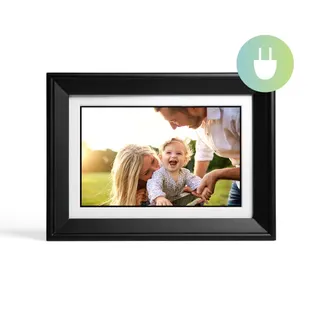


A digital photo frame is the gift that either lives on a kitchen counter for five years or goes back in its box by February. The difference is rarely the brand. It's three boring questions: how sharp is the screen at its size, does its shape match the photos you actually take, and is anybody going to get a bill for it? We lined up 15 Wi-Fi frames from Aura, Skylight, Nixplay, Pix-Star, Lexar, PhotoSpring and Dragon Touch and answered those three questions for each one. The picks and price buttons sit above this article, and the full sortable sheet has every frame side by side.
The short answer: the Aura Aspen is the best all-rounder, the Aura Carver Mat is the easiest gift for a relative who hates gadgets, the Skylight Frame 2 has the sharpest 10-inch touchscreen, and the PhotoSpring Classic 10 is the budget frame that never asks for money again.
Subscriptions: which frames are actually free to own
Start here, because it's the spec that turns a nice gift into a recurring chore. Of the 15 frames, eight work fully with no paid plan, and seven keep something back.
- No plan needed: all five Aura frames, the Pix-Star LUX 10, the PhotoSpring Classic 10 and the Dragon Touch Classic 10. Aura's own FAQ promises free unlimited photo and video storage with no fees, and PhotoSpring says flatly that it never charges a subscription.
- Skylight: photos are free, but the Skylight Plus plan unlocks albums, cloud backup and remote settings. On the older Skylight Frame (10" and 15"), video and captions also sit behind Plus, which is the main complaint in Tom's Guide's review. Skylight's current Frame 2 page says photos, videos and captions are free.
- Nixplay: the free tier caps cloud storage and limits video to short clips. Paid tiers raise both.
- Lexar Pexar: it runs on Frameo, which is free for basics, but Frameo+ gates bigger batches per send, longer videos, captions and cloud backup.
Slopsheets says: If the frame is going to someone else's house, buy one where the free version is the whole product. A lapsed subscription on Grandma's frame becomes your support ticket.
Resolution: the number that varies most
Here the field spreads wide, from 1024×768 on the Pix-Star LUX 10 to 2000×1200 on the Lexar Pexar 11". Most 10-inch frames sit at 1280×800, including the Aura Carver, the Carver Mat, the original Skylight, both 10-inch Nixplays, PhotoSpring and Dragon Touch.
Two 10-to-11-inch frames break well above the pack: the Skylight Frame 2 at 1920×1200 and the Pexar 11" at 2000×1200. Tom's Guide singled out the Pexar's panel as sharp and accurate, while noting it picks up glare and fingerprints.
Does that mean the Carver looks bad? No. Engadget picked the Carver Mat as its best overall frame and called its screen the best it had tested on a frame, while admitting 1280×800 is low by modern standards. Panel quality, anti-glare finish and color tuning matter as much as the raw count at arm's length.
The catch: Resolution matters most up close. On a counter you walk past, a good 1280×800 panel is fine. On a desk two feet from your face, the 1920×1200 and 2000×1200 frames are visibly crisper.
Screen size: bigger isn't sharper
Sizes run from 10 inches up to 15.6 inches on the Nixplay Big Classic. The trap is assuming a big frame is a better frame. What you see up close is pixel density, and a big screen spreads its pixels thin.
15 inches and Full HD, so it must be the sharpest frame on the shelf.
The Nixplay 15.6" at 1920×1080 works out to about 141 pixels per inch. The 10-inch Skylight Frame 2 lands around 226.
The same goes for Aura: the 15-inch Walden and the 11.8-inch Aspen both run 1600×1200, so the Aspen is the denser of the two. Tom's Guide made the same point about Skylight, saying the 15-inch model costs more for no extra sharpness.
Pay up only if: the frame will hang on a wall or sit across a room. That's where 15 inches earns its money. For a counter or nightstand, a sharp 10 to 12 inch frame looks better.
Aspect ratio: how much of each photo gets cropped
Phone cameras shoot 4:3 by default. Frames shaped 4:3 show those photos edge to edge. Frames shaped 16:10 or 16:9 either crop the top and bottom or add bars.
- 4:3: Aura Aspen, Aura Walden, Aura Ink, Pix-Star LUX 10
- 5:3: Lexar Pexar 11"
- 16:10: Aura Carver, Aura Carver Mat, Skylight Frame 2, Skylight Frame 10", both 10-inch Nixplays, PhotoSpring Classic 10, Dragon Touch Classic 10
- 16:9: Nixplay Big Classic 15.6", Skylight Frame 15"
Aura's Carver line is also landscape only, which Engadget lists among its few downsides, while the Aspen works in portrait or landscape.
What the box won't tell you: If your camera roll is mostly vertical shots of kids and dogs, a widescreen landscape frame will either crop heads off or shrink every photo. A 4:3 frame you can stand upright fixes that.
Touchscreen: handy, smudgy, optional
Nine of the 15 frames have touchscreens: all three Skylights, all three Nixplays, the Pexar, PhotoSpring and Dragon Touch. Aura frames use a touch bar on top of the frame instead, the Aura Ink uses buttons, and the Pix-Star comes with a remote.
Touch helps when someone wants to swipe, pause, or delete a photo on the frame itself. It also means fingerprints, which NBC Select flagged on the Skylight Frame 2 during a month of testing. For an older relative, a frame that never needs touching at all (photos arrive from the family's phones) can be the friendlier design.
Video playback: almost everyone, with limits
Fourteen of the 15 play video clips. The one exception is the Aura Ink, whose color e-paper screen can't show motion. Tom's Guide and TechRadar both praise its print-like look, and TechRadar also notes the muted colors and slow refresh.
The limits differ more than the yes/no suggests. Aura plays clips up to 30 seconds with sound for free. PhotoSpring allows clips up to five minutes. Nixplay's free tier and Frameo's free tier on the Pexar keep clips short unless you pay, and the original Skylight Frames put video behind Skylight Plus.
Don't overpay for: video. A frame is a photo device first. Treat clips as a bonus and check whether the free tier is enough before you count it as a feature.
Which digital photo frame should you buy?
- Best overall: Aura Aspen. Sharp 4:3 anti-glare screen, portrait or landscape, Aura's app, no fees. Tom's Guide's current top pick.
- Easiest gift: Aura Carver Mat (or the plain Carver). Engadget's best overall, and the free unlimited storage means nobody inherits a bill.
- Sharpest touchscreen: Skylight Frame 2, if you're fine with paying yearly for the extras.
- Highest resolution: Lexar Pexar 11", for people who want local storage and don't need Google or Apple Photos sync.
- Budget with no fees: PhotoSpring Classic 10, with the Dragon Touch Classic 10 and Pix-Star LUX 10 as no-fee alternatives.
- Looks like a real print: Aura Ink, if you can accept slow refreshes and no video.
FAQ
Do digital photo frames need Wi-Fi to work?
To receive new photos, yes. Aura frames have no local storage for your library and depend on the cloud. Skylight frames store photos on the device and keep showing them offline. The Pexar and Dragon Touch carry 32GB of built-in storage plus SD and USB slots, and the Pix-Star takes SD cards and USB sticks too.
Can the whole family send photos to one frame?
On every frame here, yes. Each brand has a phone app or email address that invited family members can send to, which is the main reason to buy a Wi-Fi frame over an offline one.
Are Aura frames really subscription-free?
Per Aura's own FAQ, yes: unlimited photo and video storage with no fees. It is the main reason Aura frames take four of the top five spots on our sheet.
Sources / further reading
- Tom's Guide: The best digital photo frames in 2026
- Engadget: The best digital frames for 2026
- NBC Select: Aura vs Skylight, tested for a month
- Which?: Best digital photo frames 2026, tried and tested
- TechRadar: Aura Ink review
- Tom's Guide: Aura Ink review
- Tom's Guide: Lexar Pexar 11-inch digital frame review
- Tom's Guide: Skylight Frame review
- Tom's Guide: Nixplay Smart Photo Frame 10.1 inch Touch review
- Tom's Guide: PhotoSpring 10 review
- Tom's Guide: Dragon Touch Classic 10 review
- Aura: Carver product page and storage FAQ
- Skylight: Frame 15 product page and frame comparison