

Most baby monitor boxes lead with the camera resolution. The spec that decides whether you'll still like the thing at 3 a.m. is how it connects: a private radio link to a parent screen, an app on your phone, or both. After that come three questions. Can you aim the camera from bed? Does it track breathing or vitals, and who has actually checked that claim? And will it bill you every month? Those are the columns behind the 16 monitors in this comparison, from eufy, Nanit, Owlet, VTech, Infant Optics, Babysense, Philips Avent, Momcozy, Harbor, Miku, CuboAi and Snuza. The shortlist sits above this article, and the full sortable sheet lines every model up side by side. Down here we go column by column and point out where the box oversells.
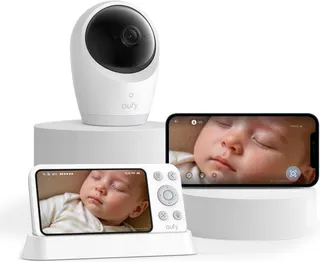
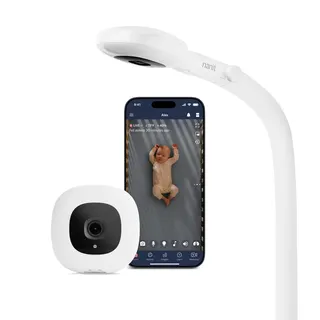
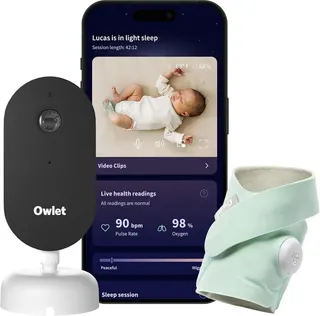
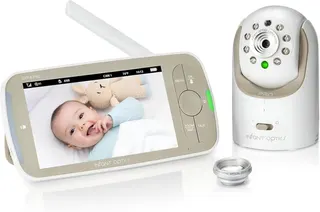
The lineup: the eufy Baby Monitor E21; the Nanit Pro; two Owlets (the Dream Duo (Gen 3) and the Dream Sock on its own); three VTechs (the RM7766HD and two audio-only units, the DM1411 and DM1211); the Infant Optics DXR-8 PRO; two Babysenses (the PRO and the True Sleep); the Philips Avent Premium Connected; the Momcozy BM01; the Harbor Baby Monitor; the Miku Pro; the CuboAi Smart Baby Monitor 3; and the Snuza Hero SE, a clip-on movement monitor.
Quick answers, if you only read this far:
- Best overall: the eufy E21, BabyGearLab's best monitor for most families. It has a parent screen, an app when you want it, and no subscription.
- Best Wi-Fi smart monitor: the Nanit Pro, Wirecutter's Wi-Fi pick, if you want sleep data and don't mind using your phone as the screen.
- Best for vitals: the Owlet Dream Duo (Gen 3). Its Dream Sock is the only device on this sheet with FDA clearance, and it covers pulse rate and oxygen notifications.
- Best without Wi-Fi: the Infant Optics DXR-8 PRO, Forbes Vetted's best overall after testing 19 monitors.
- Best audio-only: the VTech DM1411, Wirecutter's audio pick.
Slopsheets says: No monitor on this sheet prevents SIDS, and none is cleared to. The FDA says no device, infant monitors included, has been authorized to prevent SIDS or SUID. A monitor tells you what's happening. Safe sleep practices are what lower the risk.
Connection: local, Wi-Fi or hybrid
This column decides more about daily life than any other. A local monitor talks to its own parent unit over a private radio link. It doesn't touch your router or the internet, and you can't watch from work. A Wi-Fi monitor sends video to an app, so you can check in from anywhere, but your phone becomes the monitor and your router becomes part of the safety chain. A hybrid does both. The camera talks straight to a parent screen at home and also streams to the app.
Wirecutter splits its picks the same way, with a local-video pick (the Babysense PRO), a Wi-Fi pick (the Nanit Pro), a hybrid pick (the VTech RM7766HD) and an audio pick (the VTech DM1411). Six monitors here are local, four are hybrids, and five run on Wi-Fi alone. The Snuza Hero SE has no link to anything. It buzzes and beeps on the baby.
Hybrids are where the category is heading, and the eufy E21 shows why. eufy gives the camera a physical Wi-Fi switch. With it off, the camera talks only to the included 5-inch screen. With it on, you also get the app. BabyGearLab, which says it has tested more than 110 monitors since 2012, named the E21 its best monitor for most families. A tester there said they could monitor without the app, "which felt like the best of both worlds." The Harbor works with or without the internet too, per Harbor, and Forbes Vetted says its parent unit doesn't feel secondary to the app. The Philips Avent Premium Connected's parent unit works without Wi-Fi, and the app uses it when it's there, according to Fathercraft's review. Philips paid Fathercraft to produce that review, which Fathercraft discloses.
The catch: "No Wi-Fi" also means no checking from your phone. If a sitter, a grandparent or a date night is in your future, buy a hybrid now rather than a second monitor later.
Range: the column we didn't add, and why you should still test it
Range isn't a column on this sheet, because the makers' numbers are close to fiction and we only list specs we can verify. BabyGearLab is blunt about it: "Do not believe the manufacturer's range claim!" Its Babysense PRO test makes the point.
Here's the twist: Wirecutter, testing the same monitor, says it worked throughout a three-story townhome, concrete basement included. Both can be true, because walls and building materials vary that much. Set the monitor up the day it arrives, walk it to the farthest room you'll use, and return it if it drops.
Parent unit: a screen, a speaker, a base or your phone
The parent unit column says what sits on your nightstand. Eight monitors include a video screen. The two VTech audio monitors include an audio receiver. Both Owlets come with a bedside alarm base: Owlet says it glows green when readings are in range, and flashes red and sounds an alarm when they aren't. The Nanit Pro, Miku Pro and CuboAi 3 have no parent unit, so the app is the monitor.
Phone-only monitoring works, but it ties the baby to a device that also takes calls, runs out of battery and closes apps in the background. BabyGearLab's main knock on the Owlet Dream Duo is that it has no parent device, so your smartphone is the monitor. Nanit now sells a separate 8-inch Home Display, but it's an extra purchase, so the Nanit Pro is listed here as phone only.
Screen size isn't a column because it rarely decides anything. The Harbor's 10.1-inch screen is the biggest here and the VTech RM7766HD's 7-inch screen comes next. Most of the rest are around 5 inches.
Camera resolution: the number on the box
4K camera, so you'll see every eyelash on the parent screen.
The eufy E21's parent screen is 720p. The 4K helps when you zoom in, and in the app, which is still a good reason to want it.
The resolution column lists the camera, not the screen you watch it on. On local monitors, the parent screen sets the limit anyway: the DXR-8 PRO and Babysense True Sleep have 720p screens, and the Babysense PRO's screen is 1080p. The sharpest cameras here are the eufy E21 (4K), the CuboAi 3 (2.5K), and the Owlet Dream Duo and Harbor (2K each).
Resolution still doesn't buy good video. In BabyGearLab's video scores, the 720p-screen Babysense True Sleep scored 6.0 for video, the same as the 1080p Babysense PRO. Night vision, lens quality and compression matter as much as pixel count. Forbes Vetted named the 720p DXR-8 PRO its best overall anyway, citing its range, active noise reduction and easy controls.
Remote pan and tilt: aiming the camera from bed
Six monitors let you swivel the camera from the parent unit or app. All of them have dedicated screens: the eufy E21, VTech RM7766HD, DXR-8 PRO, both Babysenses and the Momcozy BM01. On BabyGearLab's list, the E21's remote camera is the "swirly camera fun" that sold its testers.
The smart cameras are fixed, and that's on purpose. The Nanit, Miku and CuboAi are built to sit overhead on a wall mount or floor stand, because their sleep tracking needs a top-down view. Nanit says sleep tracking needs the Floor Stand or Wall Mount. The trade-off shows up later. BabyGearLab notes that once you stop using the Nanit's movement monitoring, you're left with a stationary camera and a narrow view. The Owlet Dream Sight camera has no remote movement either, per Reviewed. Harbor's camera head turns by hand, and Forbes Vetted lists no remote adjustment.
Breathing and vitals tracking: read the fine print
This is the column to read slowly. The values describe what each product says it senses, not what it can prevent.
- Pulse and oxygen (FDA-cleared sock): the Owlet Dream Sock, sold alone or in the Dream Duo. Owlet says the sock received FDA De Novo clearance as an over-the-counter pulse oximeter. If oxygen drops below a preset zone, the base flashes red and sounds an alarm. BabyGearLab calls the Dream Duo its favorite for tracking vitals, and also warns that many parents may find that much data stressful.
- Breathing motion from a camera: the Nanit Pro tracks the motion of a patterned band or sleepwear, which Nanit calls Breathing Wear. The tracking needs no subscription. The Miku Pro and Philips Avent Premium Connected read the chest motion with no wearable at all. Both makers say these are not medical devices. Fathercraft points out that the Philips shows breaths per minute and sleep states but doesn't alarm when breathing stops, and that it needed the camera about 3 feet from the baby.
- Movement from mattress pads: the Babysense True Sleep puts two sensor pads under the mattress. Babysense says it alarms if movement stops for 20 seconds or drops below 10 micro-movements per minute.
- Movement from a clip: the Snuza Hero SE clips onto a diaper and senses tummy movement. Snuza says it vibrates after 15 seconds without movement and sounds an alarm at 20. Snuza says it senses movement only and doesn't measure breathing or any vital sign, and BabyGearLab says it's only accurate until your baby can roll over.
What the box won't tell you: The American Academy of Pediatrics says home cardiorespiratory monitors should not be used to reduce the risk of SIDS. In 2025, the FDA warned parents not to use unauthorized infant monitors that claim to measure vital signs. If a monitor helps you sleep, use it. Keep following safe sleep practices either way.
Subscription: what you pay after the box
Ten monitors here have no subscription: every local and audio monitor, the Snuza, and three hybrids, the eufy E21, the Philips Avent and the VTech RM7766HD, whose app is free.
Four have optional extras. You can skip Nanit's Insights plans and still get live video, sound and motion alerts, two-way audio and breathing-motion monitoring, per Nanit. Insights adds sleep analytics, cry detection and video history. Owlet360 is optional on both Owlets, and adds extended video storage and daily reports. Harbor leaves core monitoring free and charges monthly for AI alerts and sleep insights.
Two put key features behind a membership. Miku's store says the Miku Pro requires its paid monthly membership. Forbes Vetted, which tested it with a membership, still recommended it without one. CuboAi includes a free year of CuboAi Care Premium. After that, the covered-face and rollover alerts that sell the camera are Premium-only.
Pay up only if: you'll actually open the sleep charts. Check what the camera does with no plan at all, and add up two years of fees before you compare sticker prices.
Sources / further reading
- BabyGearLab: The 10 Best Baby Monitors
- BabyGearLab: The Best Video Baby Monitors
- BabyGearLab: Babysense PRO Full HD review
- Wirecutter: The Best Baby Monitors
- Forbes Vetted: The 5 Best Baby Monitors, After Extensive Parent Testing Of 19 Models
- Reviewed: Owlet Dream Sight Baby Monitor Review
- Consumer Reports: CuboAi Smart Baby Monitor 3
- Fathercraft: Philips Avent Premium Connected baby monitor review (sponsored by Philips Avent)
- FDA: Do Not Use Unauthorized Infant Devices for Monitoring Vital Signs
- AAP News: New safe sleep recommendations can help pediatricians guide families
- Owlet: Dream Sock
- Owlet: Dream Duo (Gen 3)
- Nanit: Insights plans guide
- eufy: Baby Monitor E21
- Miku: Miku Pro Smart Baby Monitor
- CuboAi: additional charges on CuboAi Monitor 3
- Harbor: Harbor Baby Monitor
- Babysense: True Sleep