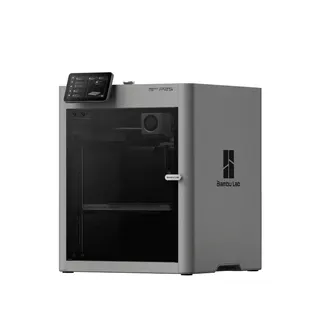
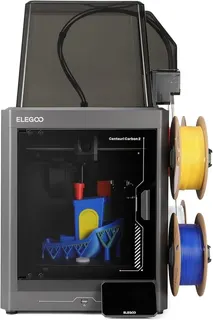
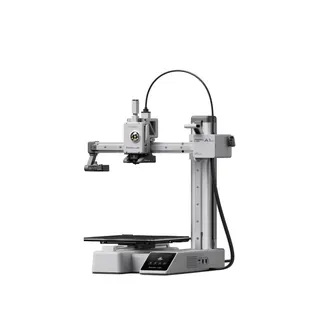
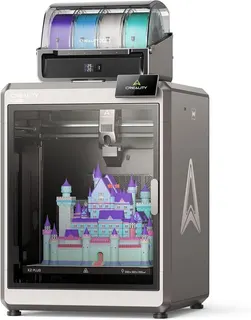


Every 3D printer box leads with a speed. 500 mm/s, 600 mm/s, and on Bambu Lab's two dual-nozzle flagships, 1,000 mm/s. It's the least useful number on the box. The things that decide whether a printer fits your desk, your filament and your patience are bigger and duller: how much it can build, how hot the nozzle gets, whether there's a box around it, whether it can swap colors, and how it moves.
Those are the columns in the full 3D printer sheet, and this comparison walks through 20 filament (FDM) printers on each of them. The field: seven from Bambu Lab, three each from Creality and Flashforge, two each from Elegoo, Prusa and QIDI, and one from Anycubic. Every one is a brand-name machine with real reviews behind it, from the small A1 mini up to the 350 mm cube of the Creality K2 Plus.
A few popular names didn't make it. The Elegoo Neptune 4 series and Anycubic's Kobra 3 Combo are now largely out of stock. The Ender-3 V3 KE and Kobra S1 didn't clear our bar on buyer feedback. Resin printers are a different machine with different specs and will get their own sheet.
Build volume: 5.8 to 42.9 liters
Build volume is the biggest single thing you can print in one piece, and it's the spec people outgrow first. We list it in liters so the column sorts properly. The exact dimensions are in each row's note.
The middle of the market has settled on one size: a 256 mm cube, or 16.8 liters. Bambu Lab's A1, P1S and P2S and both Elegoo Centauri Carbons all use it, and the X2D is a hair taller. If a print fits on one of those, it fits on most of this table. Below that sit the 220 mm machines: the Creality K1C and Ender-3 V3 SE, and the three Flashforge printers at 10.6 liters. The Bambu A1 mini is the smallest here at 180 mm a side.
At the big end, the K2 Plus Combo leads at 42.9 liters, followed by the Bambu A2L (34.3) and H2D (33.8), then QIDI's Plus4 (26.0). Big beds come with real costs. They take longer to heat, and they take up a lot of room. Per Tom's Hardware's review, the K2 Plus sometimes runs a long preheat before a print starts.
Slopsheets says: Buy for the largest part you print often, not the largest part you can imagine. A 256 mm cube handles helmets in sections, most cosplay props and nearly every household fix. Go bigger only if you keep splitting models to make them fit.
Max speed: the number on the box
The claimed speeds here run from 250 mm/s on the Creality Ender-3 V3 SE to 1,000 mm/s on the Bambu H2D and X2D, and most printers say 500 or 600. Treat the column as a ceiling the manufacturer chose to print on the box, because the brands don't even measure the same thing. Flashforge's spec table gives the AD5X a 300 mm/s maximum print speed and a 600 mm/s travel speed, then puts 600 in the headline. QIDI's 600 is the toolhead's top speed. Prusa doesn't publish a top speed at all, so both Prusa rows are blank.
The real limit is how fast the hotend can melt plastic. Prusa's knowledge base puts a standard all-metal hotend at 8 to 12 mm³/s and gives PLA a typical ceiling of 12 to 20 mm³/s. A 0.2 mm layer with a 0.45 mm line at 600 mm/s needs about 54 mm³/s, roughly three to six times what those figures allow.
Hotend flow and acceleration matter more than the headline number. Tom's Hardware's MK4S review found that Prusa's high-flow nozzle raised flow on Prusament PLA from 16 to 24 mm³/s. That kind of upgrade shortens real prints; a bigger number on the box doesn't.
1,000 mm/s, so this printer finishes jobs twice as fast as a 500 mm/s one.
Most of a print is short moves, corners and cooling pauses, and melt rate caps all of it. Doubling the top speed nowhere near halves the clock.
Max nozzle temperature: which filaments you can use
Nozzle temperature decides which plastics you can print at all. The Ender-3 V3 SE tops out at 260 °C, which Tom's Hardware notes limits it to PLA, PETG and TPU. Flashforge's Adventurer 5M and 5M Pro stop at 280 °C, and both Prusas at 290 °C. Most of the field sits at 300 °C, which covers ABS and ASA. The Elegoo Centauri Carbon reaches 320 °C. The Centauri Carbon 2, Bambu H2D and Creality K2 Plus reach 350 °C. QIDI's Q2 and Plus4 go highest at 370 °C, and Tom's Hardware's Plus4 review found its prints excellent in ABS, ASA, nylon and carbon-fiber polycarbonate.
A hot nozzle alone doesn't print nylon and polycarbonate well. Those plastics shrink and warp as they cool, so they also need a warm, still chamber, which is the next column. Abrasive carbon-fiber filaments also need a hardened nozzle. Creality's K1C ships with a steel-tipped one, which Tom's Hardware calls the whole point of the model.
Don't overpay for: a 350 °C hotend if you print PLA and PETG. Both are happy below 260 °C. High-temp hardware only pays off with engineering filaments, and those also need the enclosure below.
Enclosure: open frame, enclosed, or heated chamber
Eight of the 20 are open frame, seven are enclosed boxes without a heater, and five have an actively heated chamber: the Bambu H2D and X2D, the Creality K2 Plus Combo (up to 60 °C) and QIDI's Q2 and Plus4 (up to 65 °C). The "Enclosed" group heats only from the bed. Bambu says the P2S's airflow flaps hold its chamber at roughly 50 °C, and Tom's Hardware found that the Prusa CORE One warms its chamber toward 55 °C by running the bed hot, which is slow in a cold room. Passive heat can still be enough. In Tom's Hardware's review, the Centauri Carbon 2 printed PAHT-CF and polycarbonate without warping.
An enclosure also helps with what the printer releases into the room. UL's Chemical Insights research found that filament printers emit ultrafine particles and VOCs, that ABS and nylon emit significantly more than PLA, and that a ventilated enclosure cut particle concentration by 99.7% in the research it cites. An open-frame printer in a bedroom has none of that protection.
What the box won't tell you: a closed door is not a filter. Look for a carbon or HEPA filter, or vent the box outside. The Flashforge 5M Pro has HEPA plus activated carbon, the Creality K1C has a cabin filter, and Bambu rebuilt the X2D's filtration.
Multi-color: 17 of 20 can add it
Seventeen of the 20 have a first-party way to print in several colors or materials. The exceptions are the Ender-3 V3 SE and Flashforge's Adventurer 5M and 5M Pro; Flashforge's own FAQ says the 5M Pro can't be converted. Most of the 17 use an external spool box: Bambu's AMS lite and AMS, Creality's CFS, Elegoo's CANVAS, QIDI's Box. Prusa uses its five-filament MMU3. The Flashforge AD5X has its four-spool IFS built in, and Anycubic's Kobra X moves the color switching into the toolhead.
How the system is built matters as much as whether one exists. Tom's Hardware's Kobra X review timed its color swaps at about 35 seconds each, against 90 or more on a Bambu A1, and it fed TPU as soft as 85A. Reliability varies too: the QIDI Box jammed constantly on two review units in Tom's Hardware's Q2 test, and the reviewer's advice was to skip the combo.
The catch: every color change purges plastic, and on a detailed multicolor print the purge can outweigh the model. Reviewers flagged purge waste on almost every system here. If you mostly print one color, a combo bundle is filament you'll pay for and then throw away.
Motion system: bed slinger or CoreXY
Six printers here are bed slingers. The bed slides back and forth under the nozzle: Bambu's A1 mini, A1 and A2L, the Ender-3 V3 SE, the Prusa MK4S and the Anycubic Kobra X. The other 14 are CoreXY: the bed only drops, and the toolhead moves in X and Y on a belt system. CoreXY suits enclosures and high acceleration, and a heavy part that never moves sideways stays put on a still bed.
Bed slingers are simpler, and done well they're excellent. The MK4S is the proof: Tom's Hardware ranks it among the best printers it has tested. The weakness shows up at large sizes. In Tom's Hardware's A2L review, the machine's vibration at speed shook the AMS lite off an IKEA Lack table after 45 minutes. A big bed slinger needs a heavy, solid stand.
Pay up only if: you print tall, thin parts or want an enclosure. Then CoreXY is worth it. For desk-sized PLA prints, a well-made bed slinger like the A1 is just as good and often quieter.
Which 3D printer should you buy?
Best overall: Bambu Lab P2S. It has the enclosed CoreXY layout, a 256 mm cube, an easy-swap nozzle and Bambu's AMS option. Tom's Hardware says its Active Airflow lets you print every supported material with the door closed. It's the safe default for almost anyone.
Best value for enclosed color: Elegoo Centauri Carbon 2 Combo. You get an enclosed CoreXY with the four-color CANVAS built in and a 350 °C hotend. TechRadar and Tom's Hardware both rated it highly; the knocks are fiddly spool holders and a restrictive slicer.
Best first printer: Bambu Lab A1 mini. It's small, quiet and simple to run, with a cheap path to four colors through the AMS lite. The 180 mm bed is the only real limit.
Best for big and engineering prints: Creality K2 Plus Combo. It has the largest build volume here, an actively heated chamber and a 350 °C hotend. Tom's Hardware calls it one of the best printers you can buy.
Frequently asked questions
What's the best 3D printer for a complete beginner?
The Bambu Lab A1 mini or A1. Both level themselves and run quietly, and the A1 gives you the full 256 mm cube. The Creality Ender-3 V3 SE is the budget alternative, with very good auto-leveling, but it has no Wi-Fi and a 260 °C nozzle.
Can I print ABS or nylon on an open-frame printer?
Small ABS parts, sometimes. Nylon and polycarbonate, not reliably. They warp without a warm chamber, and they emit more particles and VOCs than PLA, which is a second reason to keep them in a filtered box. For those materials, start with the heated-chamber group: the Bambu H2D and X2D, Creality K2 Plus and QIDI Q2 and Plus4.
Do multi-color printers waste a lot of filament?
Yes, every system here purges old filament at each color change. Anycubic pitches the Kobra X's toolhead switching as a purge saver, though All3DP's review found the savings smaller than claimed. Laying out a model so colors change less often helps more than any hardware choice.
Sources / further reading
- Tom's Hardware: Bambu Lab P2S review
- Tom's Hardware: Bambu Lab A1 review
- Tom's Hardware: Bambu Lab A1 Mini review
- Tom's Hardware: Bambu Lab A2L review
- Tom's Hardware: Bambu Lab X2D review
- Tom's Hardware: Bambu Lab H2D review
- Tom's Hardware: Creality K2 Plus review
- Tom's Hardware: Creality K1C review
- Tom's Hardware: Creality Ender 3 V3 SE review
- Tom's Hardware: Elegoo Centauri Carbon 2 review
- TechRadar: Elegoo Centauri Carbon 2 Combo review
- Tom's Hardware: Prusa MK4S review
- Tom's Hardware: Prusa CORE One review
- Tom's Hardware: QIDI Plus4 review
- Tom's Hardware: QIDI Q2 Combo review
- Tom's Hardware: Anycubic Kobra X review
- All3DP: Anycubic Kobra X review
- Tom's Hardware: Flashforge AD5X review
- Tom's Hardware: Flashforge Adventurer 5M Pro review
- Prusa Knowledge Base: Max volumetric speed
- UL Chemical Insights: 3D printing emissions research